5. Documents, pictures and video
Every file the assistant opens is acquired and fingerprinted, whatever its type. What differs is how much of it the assistant can read.
| Kind of file | How it is read | Can be quoted in a finding |
|---|---|---|
| PDF with text, Word (.docx), and any plain-text file: text, CSV, HTML, email (.eml), source code, scripts, logs | The text is taken from the file. | Yes |
| Scanned PDF, photograph or screenshot of a document (PNG, JPEG, WebP, BMP, GIF) | Read by OCR on this computer. | Yes, labelled “read by OCR” |
| Photograph of something else | Metadata, and the model can look at it. | No (see below) |
| Video (MP4, MOV, WebM) | Frames sampled about once a second, on-screen writing read by OCR; the model can look at frames. | On-screen writing only, labelled with frame and time |
| Handwriting | OCR is unreliable; the model looks at the picture and reads it itself. | No (see below) |
| Anything else (spreadsheets, archives, audio) | Acquired and fingerprinted; metadata where available. | No |
Text read by OCR
OCR runs on your computer; the picture is not sent anywhere for it. It reads printed English. It can misread characters, most often digits and names, so:
- pages read by OCR are marked for the assistant, and it is told to look at the picture before relying on a name, date or amount;
- a finding that quotes OCR text carries a read by OCR label. Check it against the original before confirming;
- the OCR result is saved as a plain-text version of the document, listed under the original on the Evidence tab (see chapter 6).
When OCR was unsure of a page, the assistant is told the text is unreliable. That usually means handwriting, a poor scan or a picture with little writing in it.
Pictures
The assistant can report a photograph’s camera, capture time, editing software and GPS position, or that this information has been removed. It can also look at the picture. Looking sends the picture to the model.
What it says about a picture is its own observation. It is told not to identify people by their face, and not to state that a picture or signature is genuine or altered; it reports what it sees as something to corroborate.
Video
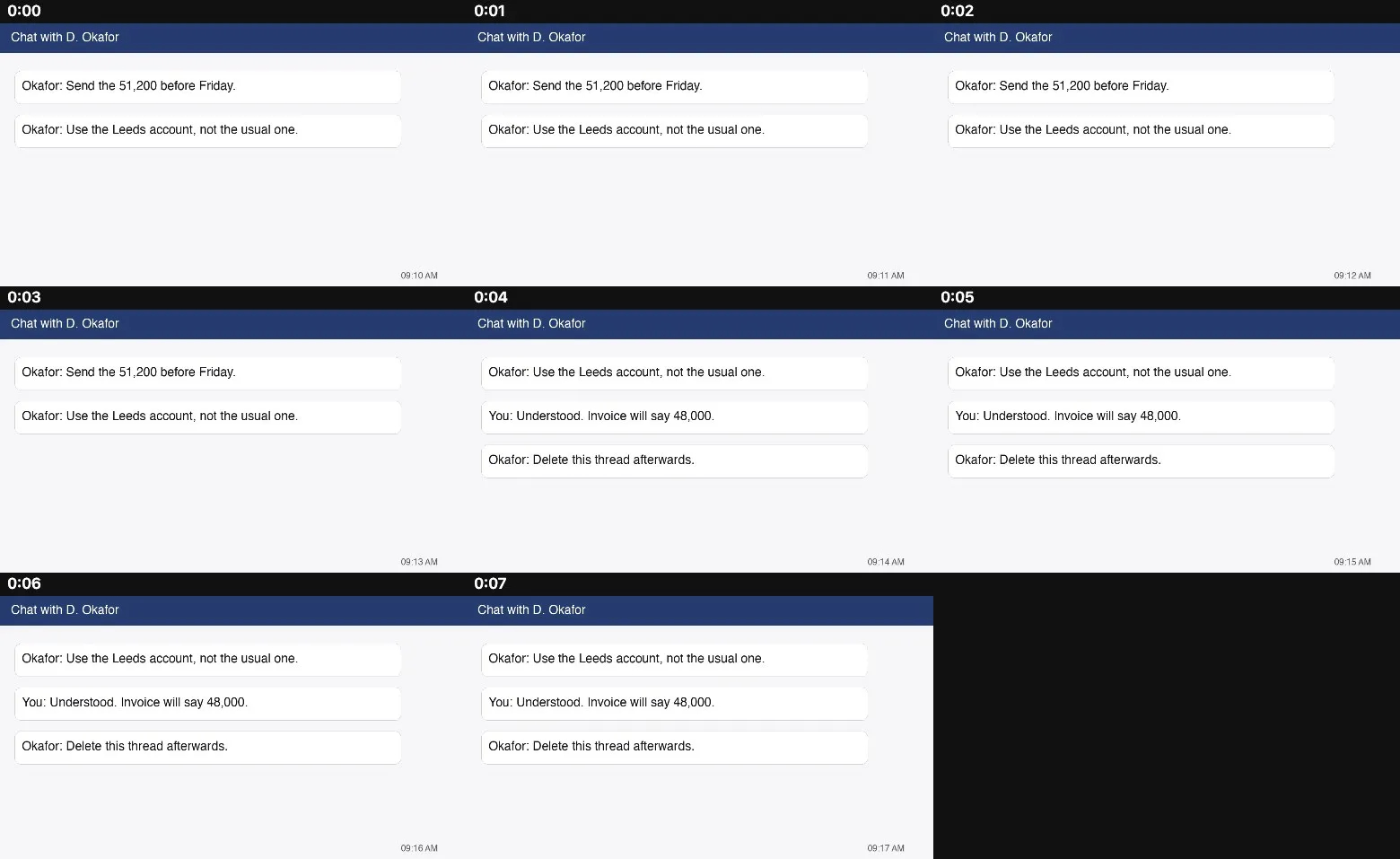
- Looking through a video shows the model one sheet of frames spread across the video or a part of it.
- Looking at a moment shows one frame at full size.
- On-screen writing in a screen recording or a filmed document is read, searchable and citable. A finding shows the frame and its time, for example “frame 5 at 0:04”.
Limits to keep in mind: at most 40 frames are sampled for text, however long the video; what happens between frames is not seen; sound is not examined at all. Videos are decoded on your computer. MP4, MOV and WebM files in common encodings work; some (HEVC on some computers, AVI) do not, and the assistant will say so.
Handwriting
No handwriting recogniser is built in, because the ones that run locally invent plausible text. The assistant reads handwriting by looking at the picture, with a model that accepts pictures. It is told to mark words it cannot make out as [illegible] and to say that a person should check its reading. Its reading cannot yet be quoted in a finding.
Metadata is a lead, not proof
Authors, dates, software names and GPS positions inside a file can be edited or stripped. The assistant is told to present them as indications and to say what would settle the question, such as the original file or the sender’s records.